Onboarding Guideline
Department
Table of Contents
Welcome to Kiluth
— We’re thrilled to have you on board.
At Kiluth, we believe great work happens when talented people collaborate with purpose, clarity, and trust. Whether you’re joining as a developer, designer, project manager, or business executive, you’re now part of a team that values craftsmanship, transparency, and continual learning.
This onboarding guide is your starting point. It’s designed to help you get set up, understand how we operate, and navigate our tools and systems confidently.
About Kiluth
Kiluth is an end-to-end technology studio.
A forward-thinking technology studio based in Bangkok, Thailand, dedicated to building innovative solutions, experimenting with cutting-edge technologies, and delivering exceptional results.
We specialize in full-stack development, cloud architecture, and digital transformation, helping businesses modernize their technology stack and achieve their digital goals.
We work across diverse verticals — from automotive and property to e-commerce and healthcare — delivering full-service digital solutions built on modern, scalable technology.
Our Culture
We believe in:
| We believe in: | |
|---|---|
| 1 | Craftsmanship — building things the right way, with care and attention to detail. |
| 2 | Transparency — keeping communication open, direct, and constructive. |
| 3 | Ownership — taking responsibility for outcomes, not just tasks. |
| 4 | Empathy — understanding people and balancing work with life. |
Every individual at Kiluth contributes to shaping our culture. We value flexibility, initiative, and a growth mindset over rigid structures.
Learn More
For a complete overview of our company — including our mission, values, structure, and principles — please review the Organization Profile at https://www.kiluth.com/organization-profile-internal.pdf.
Communication & Collaboration Tools
At Kiluth, communication and collaboration are the foundation of everything we do. We use three main platforms to stay connected, organized, and productive:
| Tool | |
|---|---|
| 1 | Google Workspace |
| 2 | Asana |
| 3 | Kiluth Portal |
Each tool serves a specific purpose, and together they form the core of our daily operations.
2.1 Google Workspace
Google Workspace is used for company email, document collaboration, meetings, and file storage. Every employee receives a Kiluth email account during onboarding.
| Tool | Purpose |
|---|---|
| Gmail, Google Chat | Handle all company communications |
| Google Drive | Shared folders for documents and assets |
| Google Docs, Sheets, and Slides | Real-time collaboration on files |
| Google Meet | Meetings and calls |
2.2 Asana
Asana is our project and task management platform. It helps everyone track what needs to be done, by whom, and by when. You’ll receive an invitation to join Kiluth’s Asana workspace shortly after your Google Workspace account is created.
| Key Uses | |
|---|---|
| 1 | Managing ongoing projects and daily tasks |
| 2 | Assigning work and tracking progress across departments |
| 3 | Reviewing and approving work in shared boards |
Asana is Kiluth’s central task and project management platform — it keeps everyone aligned, transparent, and accountable. Every task, project, and internal request must exist as a card in Asana. We do not assign work verbally without an Asana record.
Board Structure
Each department has its own board in Asana, plus two special boards:
| Board Type | Description |
|---|---|
| Projects Board | One card per project (no duplicates) |
| Operations Board | Company-level or administrative tasks (e.g., “Fix meeting room AC,” “Update Kiluth Portal”) |
All boards generally follow the same column flow:
Backlog → In Progress → In Review → Completed
Some boards include custom columns for that department’s specific workflow.
Task Creation & Ownership
| Task Creation & Ownership | |
|---|---|
| 1 | New tasks start in Backlog. |
| 2 | Each task must include: |
| Field | Description |
|---|---|
| Title | Clear and action-oriented task name |
| Description | Context, notes, or reference links related to the task |
| Priority | Defines urgency: Low / Medium / High |
| Estimated Manhours / Actual Manhours | Expected vs. actual time spent on the task |
| Assignee | The person currently responsible for completing the task |
| (Optional) Department / Account Manager / Project Manager / Job | Additional details depending on the task’s type or department |
Tasks move across columns as their status changes. The assignee and column can change during the process depending on who’s working on it.
Project Linking & Job Structure
Each card in the Projects Board follows a standardized naming format to ensure consistency and easy tracking across systems: “[PROJ-0000] [ClientName] Project Title”.
Kiluth’s Central Project Database Relationship
The Project ID (e.g., PROJ-0000) comes from Kiluth’s central project database (ERPNext) and is also used for financial and reporting purposes. Using the same ID in Asana makes it easy to trace tasks, timelines, and deliverables for each client project.
Project Creation Process
New Project IDs are created by the ERPNext Administrator, who is responsible for setting up new projects in both ERPNext and the Projects Board in Asana.
Once the project is created, team members can begin linking related tasks using the same ID to maintain consistency.
Job Field
Each task includes a Job field specifying which project or client the task belongs to.
This helps identify the context of a task even when it’s not directly linked to a Projects Board card.
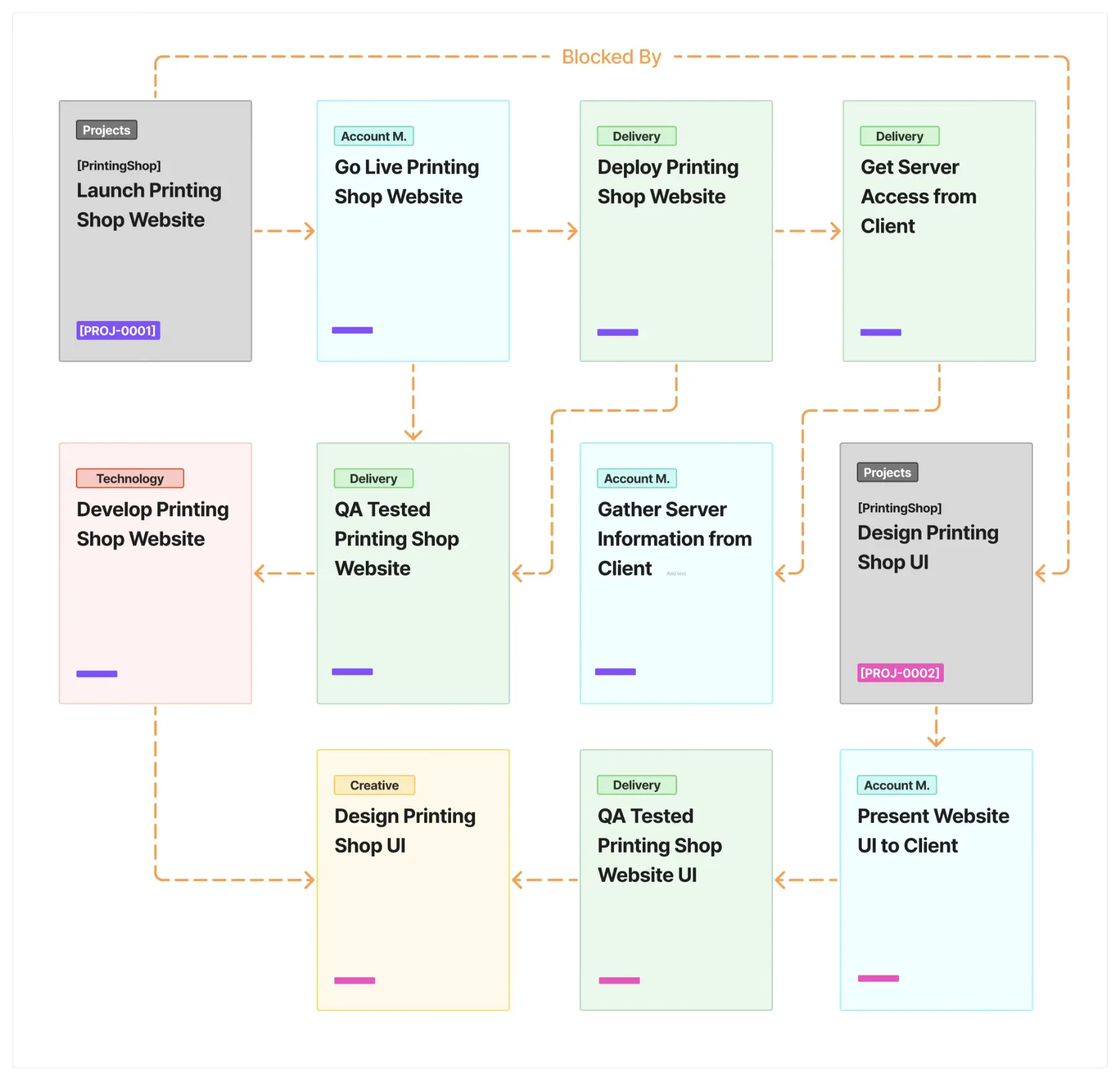
Dependency Field
Dependencies define relationships between tasks — showing what must be completed before another can start/end. They’re used across all boards:
| They’re used across all boards: | |
|---|---|
| 1 | Project boards: to show workflow between departments and link back to the main project. |
| 2 | Operations boards: to coordinate internal tasks that depend on one another (e.g., onboarding steps, system setup, maintenance). |
| In Summary | |
|---|---|
| 1 | Job field → Shows which project or client the task belongs to. |
| 2 | Dependency field → Defines task relationships for both project and operational workflows. |
| 3 | Project ID → A unique identifier used to link data across systems (including ERPNext) |
| 4 | Operational tasks → Can also use dependencies, but don’t need to link to client or external projects. |
| Rules & Workflow | |
|---|---|
| 1 | All assignments must have a card — no work exists outside Asana. |
| 2 | Cards in In Review are typically assigned to someone else (reviewer or approver). |
| 3 | Once completed, move the card to Completed — don’t leave finished work untracked. |
| 4 | You may assign teammates from other departments if their review or input is needed. |
| 5 | Every board is filtered by “My Tasks” — assigning correctly ensures visibility for all. |
| Communication & Etiquette | |
|---|---|
| 1 | Use comments within each task to communicate updates or feedback. |
| 2 | Mention teammates using @name to notify them directly. |
| 3 | Attach files, screenshots, or links rather than relying on chat threads. |
| 4 | Be clear, concise, and specific when giving feedback or asking questions. |
| 5 | Use Asana as the single source of truth for ongoing work. |
| Example Uses | |
|---|---|
| 1 | Design Board: “Landing Page Hero Section Revision” |
| 2 | Development Board: “Implement Payment Webhook (Stripe)“ |
| 3 | Projects Board: “[PROJ-0010] [HandyMan] Global Marketing” (links all related tasks) |
| 4 | Operations Board: “Prepare Employee Portal Access Guide” |
In Short
Asana keeps everyone aligned. If it’s not in Asana, it doesn’t officially exist.
2.3 Kiluth Portal
The Kiluth Portal is our internal hub for forms, HR management, and personal records. It’s built on ERPNext, customized to support Kiluth’s workflow. You’ll receive access to the portal once your onboarding process begins.
| Main Functions | |
|---|---|
| 1 | Submit company forms (e.g., leave requests, expense claims, equipment loans) |
| 2 | Access your profile and view previous submissions |
| 3 | Track internal requests and form statuses |
| How to Access | |
|---|---|
| 1 | Go to portal.kiluth.com |
| 2 | Sign in using your Kiluth email credentials provided during onboarding |
| 3 | Explore the sidebar menu for available forms and resources |
The Portal serves as the official record system for HR, administrative, and internal operations. All formal requests should go through the Portal, not through chat or email.
Tools & Digital Resources Installation
Once your company email has been created, you’ll receive access to Kiluth’s digital workspace — the tools that power our daily communication, projects, and operations.
You’ll mainly use three platforms:
| Platforms | |
|---|---|
| 1 | Google Workspace |
| 2 | Asana |
| 3 | Kiluth Portal |
3.1 Google Workspace
Your company email will be issued in the format: firstname.lastname@kiluth.com
Use this account to access:
| Tool | Access |
|---|---|
| Gmail, Google Chat | Official work communication |
| Google Drive | Shared storage and documents |
| Google Docs, Sheets, and Slides | Real-time collaboration |
| Google Meet | Meetings and calls |
3.2 Asana
Once your Google Workspace account is active, you’ll receive an invitation to join Kiluth’s Asana workspace.
| Setup Steps | |
|---|---|
| 1 | Open the email invitation and click Join Kiluth on Asana. |
| 2 | Sign in with your Kiluth email. |
| 3 | Set your profile name and notification preferences. |
| 4 | You’ll see your assigned department board and tasks after joining. |
After you’ve been added, you’ll also receive an introductory Asana card titled “Explore Kiluth Portal”. This task introduces you to the Kiluth Portal system and includes setup instructions and links.
| Access Method | Details |
|---|---|
| Web | asana.com |
| Desktop App | Optional (Windows/Mac) |
| Mobile App | Optional (iOS/Android) |
3.3 Kiluth Portal
The Kiluth Portal is our internal system for HR, forms, timesheets, and operational requests. Each employee is issued a portal account that uses the same email format (firstname.lastname@kiluth.com) but a separate login.
| Account Setup | |
|---|---|
| 1 | You will receive an email containing your Kiluth Portal credentials and login instructions. |
| 2 | Once received, go to portal.kiluth.com and sign in using the provided credentials. |
| 3 | For security, change your password immediately after your first login. |
| Main Uses | |
|---|---|
| 1 | Submit company forms (Leave, Expense Claim, Equipment Loan, etc.) |
| 2 | Review past submissions |
| 3 | Manage your personal HR and admin records |
Tip: Bookmark portal.kiluth.com in your browser for daily access.
Privacy & Data Handling Guideline
Protecting both client and company data is a fundamental part of how we work at Kiluth. Every team member is responsible for ensuring security, confidentiality, and compliance when handling any information or system under Kiluth’s domain.
For the complete, up-to-date policy, please review the official document Kiluth Privacy & Data Handling Guideline at Kiluth Privacy & Data Handling Guideline.
| Core Principles | |
|---|---|
| 1 | Confidentiality — Only share sensitive information with authorized colleagues or channels. |
| 2 | Integrity — Keep data accurate, reliable, and well-documented. |
| 3 | Security — Use only approved tools, accounts, and storage systems; enable 2FA where possible. |
| 4 | Accountability — You are personally responsible for following these standards in all projects and communications. |
| Data Storage & Sharing | |
|---|---|
| 1 | Store all files in Google Drive, organized within the correct project or department folder. |
| 2 | Never use personal accounts, unapproved cloud services, or unsecured devices for work data. |
| 3 | Share with the minimum necessary permissions (e.g., view/comment/edit). |
| 4 | Avoid “anyone with the link” sharing unless explicitly required. |
| Communication & Access | |
|---|---|
| 1 | Communicate work matters only via Gmail, Asana, Google Meet, or the Kiluth Portal. |
| 2 | Do not forward internal emails or export internal documents without permission. |
| 3 | If you suspect any data breach or unauthorized access, notify HR/Admin immediately. |
| Device & Endpoint Security | |
|---|---|
| 1 | Keep your devices locked and password-protected. |
| 2 | Use strong passwords and enable two-factor authentication (2FA). |
| 3 | Keep operating systems and antivirus software up to date. |
| 4 | Avoid connecting to public Wi-Fi for sensitive work unless secured by VPN. |
| Handling Confidential Materials | |
|---|---|
| 1 | Delete or archive old data following project retention policies. |
| 2 | Store printed materials securely and shred when no longer needed. |
| 3 | Ensure external parties sign NDAs or equivalent agreements before data sharing. |
| 4 | Report lost or stolen devices immediately to IT or HR/Admin. |
Remember: Security is everyone’s job. Following these principles protects both Kiluth and our clients — and maintains the trust that defines our brand.
Company Forms & Requests
All company forms are submitted through the Kiluth Portal at portal.kiluth.com. These forms ensure that every internal request is properly tracked, approved, and recorded in the company system.
Note: Form fields may change occasionally. Always follow the latest version displayed in the Portal.
Request Leave
| Field | Details |
|---|---|
| Access | Portal → Forms → Request Leave |
| Purpose | Use this form to apply for annual leave, sick leave, or other types of absence. |
| Steps | 1. Select the leave type, specify dates, and add a brief reason. 2. Submit the form for approval. 3. HR/Admin will review and update your leave status. |
Expense Claim Request
| Field | Details |
|---|---|
| Access | Portal → Forms → Expense Claim Request |
| Purpose | Submit this form to claim reimbursements for work-related expenses such as travel, meals, or client meetings. |
| Steps | 1. Fill in the expense details (date, type, and amount). 2. Attach receipts or proof of payment. 3. Submit for HR/Admin approval. 4. Approved claims are reimbursed with your next payroll cycle. |
| Tip | Always include valid receipts. Claims without proof may be rejected. |
Employee Request
| Field | Details |
|---|---|
| Access | Portal → Forms → Employee Request |
| Purpose | Use this form to request tools, software, or hardware needed for work. |
| Steps | 1. Describe what you need and why. 2. HR/Admin reviews and approves the request. 3. If approved, you’ll receive an Asana card directing you to complete the Equipment Loan Agreement. |
Problem Report
| Field | Details |
|---|---|
| Access | Portal → Forms → Problem Report |
| Purpose | Use this form to report workplace issues, HR concerns, or office problems that need attention. |
| Steps | 1. Describe the issue or concern that needs to be addressed. 2. HR/Admin reviews and evaluates the report. 3. HR/Admin will contact you with next steps or updates regarding your report. |
Equipment Loan Agreement
| Field | Details |
|---|---|
| Access | Portal → Forms → Equipment Loan Agreement |
| Purpose | Required when borrowing company equipment such as laptops, monitors, or tablets. |
| Agreement Highlights | 1. Use devices only for company business. 2. Report loss, damage, or theft immediately. 3. Return all equipment upon reassignment or termination. 4. You must check “I Agree” before submission to confirm acknowledgment. |
Equipment Return
| Field | Details |
|---|---|
| Access | Portal → Forms → Equipment Return |
| Purpose | Used to confirm the return of company equipment when roles change or employment ends. |
| Process | 1. HR/Admin assigns you an Asana card to initiate the return. 2. Complete the form, listing all returned items and their condition. 3. The HR/Admin reviewer will verify before closing the task. |
Timesheet
| Field | Details |
|---|---|
| Access | Portal → Forms → Timesheet |
| Purpose | The Timesheet form allows employees to log working hours or activities for their own record and OT verification. |
| Notes | 1. Timesheet submission is optional but encouraged. 2. It provides written proof of your workload and supports payroll transparency. 3. HR/Admin may use it when reviewing overtime or project effort. |
Meeting Room Booking Request
| Field | Details |
|---|---|
| Access | Portal → Forms → Meeting Room Booking Request |
| Purpose | Use this form to reserve a meeting room for team discussions, client meetings, or internal sessions. |
| Fields | 1. Meeting Room — select the room you wish to reserve 2. Department — indicate your department 3. Agenda — describe the meeting purpose or topic 4. Start Time / End Time — specify the exact time range |
| Steps | 1. Navigate to Portal → Forms → Meeting Room Booking Request 2. Fill in all required fields and submit the form. 3. HR/Admin will review availability and confirm your booking. |
| Note | Rooms are available on a first-come, first-served basis. Please book early for important meetings. |
WiFi Access Request
| Field | Details |
|---|---|
| Access | Portal → Forms → WiFi Access Request |
| Purpose | The WiFi Access Request form allows employees to request access credentials for company WiFi networks securely. The system automatically sends the selected network’s SSID and password to the employee’s registered company email. |
| Notes | 1. Use this form whenever you need WiFi credentials for a new device or office area. 2. The password will be sent directly to your company email — please keep it confidential. 3. Each request is logged for IT record-keeping and security auditing. 4. If you did not receive the password or have issues connecting, contact the IT department. |
Working Hours, Attendance & Leave Policy
At Kiluth, we believe productivity and well-being come from trust, autonomy, and clear communication — not rigid schedules.
Our working hours and leave policies are designed to support flexibility while maintaining professional accountability.
Working Hours
| Working Hours | |
|---|---|
| 1 | The official reference hours follow typical business hours in Thailand (9:00 AM – 6:00 PM). |
| 2 | However, we operate under a flexible schedule — you may adjust your working hours as needed. |
| 3 | What matters most is output, responsibility, and coordination with your team and clients. |
| 4 | Teams are expected to maintain overlapping hours to ensure collaboration and communication. |
| Example | You may start at 10:00 AM and work until 7:00 PM, as long as team expectations and project deadlines are met. |
Attendance
| Attendance | |
|---|---|
| 1 | There is no clock-in or attendance tracking system. |
| 2 | Each person is responsible for communicating their availability and progress transparently. |
| 3 | Use Asana to reflect what you’re working on and update task statuses regularly. |
| 4 | When working remotely, ensure you’re reachable during shared collaboration hours and reply promptly to important messages. |
| Tip | Communicating early prevents delays and helps teammates plan their work efficiently. |
Leave Policy
| Leave Policy | |
|---|---|
| 1 | Leave allocations are defined in your employment terms, but we value empathy and mutual respect more than strict limits. |
| 2 | We understand that life happens — if you need rest, personal time, or recovery, simply inform your team and submit a leave request through the Portal. |
| 3 | All leave requests must be submitted via Portal → Forms → Request Leave. |
| 4 | For extended or unexpected leave, notify HR/Admin and your project manager as soon as possible. |
General Guidelines:
| General Guidelines | |
|---|---|
| 1 | Plan ahead when possible to help your team manage workloads. |
| 2 | Inform your direct manager and/or project lead before taking time off. |
| 3 | For emergencies, notify via email or message and submit the leave form as soon as feasible. |
Summary
Kiluth operates on trust and accountability.
Flexibility is earned through reliability — when everyone communicates clearly and delivers results, the entire team benefits from the freedom we uphold.
Policies & Conduct
At Kiluth, professionalism is built on trust, respect, and accountability. Our policies are designed not to restrict you, but to set clear expectations and protect both our people and our clients. They help maintain a healthy, transparent, and high-performing workplace.
Professional Conduct
| Professional Conduct | |
|---|---|
| 1 | Treat everyone — teammates, clients, and partners — with courtesy and respect. |
| 2 | Communicate clearly, constructively, and proactively. |
| 3 | Take ownership of your work — results matter more than excuses. |
| 4 | Keep commitments. If you encounter a delay or obstacle, inform your team early. |
| 5 | Support a culture of learning and continuous improvement. |
Principle: “Be responsible. Be kind. Be better than yesterday.”
Communication & Representation
| Communication & Representation | |
|---|---|
| 1 | Use professional language across all official channels (Gmail, Asana, Google Meet, Portal). |
| 2 | When representing Kiluth externally, ensure your communication aligns with company values. |
| 3 | Do not share internal information, screenshots, or project materials publicly or without approval. |
| 4 | Avoid using personal accounts for company-related communication. |
Tip: Think before you post, forward, or share — once it’s out, it’s public.
Confidentiality & Data Protection
| Confidentiality & Data Protection | |
|---|---|
| 1 | All client and company data is strictly confidential. |
| 2 | Store and share data only through approved platforms (Google Drive, Portal). |
| 3 | Do not export or forward internal documents externally without permission. |
| 4 | Refer to the Privacy & Data Handling Guideline for full details. |
| 5 | Immediately report any suspected unauthorized access or data leaks to HR/Admin. |
Device & Software Use
| Device & Software Use | |
|---|---|
| 1 | Use company-provided devices responsibly and only for business purposes. |
| 2 | Keep devices secure with passwords and enable two-factor authentication (2FA). |
| 3 | Do not install unverified, pirated, or unauthorized software. |
| 4 | Always lock or log out when leaving your desk. |
| 5 | Do not attempt to modify or repair company equipment without approval. |
Integrity & Conflicts of Interest
| Integrity & Conflicts of Interest | |
|---|---|
| 1 | Avoid activities that could harm Kiluth’s reputation or create conflicts of interest. |
| 2 | Disclose potential conflicts (e.g., working with competitors, side projects) to HR/Admin. |
| 3 | Do not accept gifts, payments, or favors that may influence work decisions. |
| 4 | Be honest and transparent in all communications and transactions. |
Compliance
| Compliance | |
|---|---|
| 1 | Follow all applicable Thai labor laws and Kiluth company policies. |
| 2 | Violations of ethical, security, or legal standards may result in disciplinary action. |
| 3 | When unsure about a policy, ask HR/Admin before proceeding — early communication prevents issues later. |
Remember: We maintain flexibility because we trust each other. Respect, professionalism, and accountability keep that trust strong.
Getting Help & Support
At Kiluth, you’re never on your own.
If you need assistance — whether it’s about HR, IT, or workflow — our HR/Admin team is your first point of contact. They act as the company’s internal directory, helping you connect with the right person or department quickly.
How to Reach Out
| How to Reach Out | |
|---|---|
| 1 | Email hr@kiluth.com or your assigned HR contact. |
| 2 | You can also reach out through company communication channels if urgent. |
| 3 | When contacting HR/Admin, include: • A short subject line (e.g., “Laptop access issue” or “Leave form question”) • A clear description of your issue • Any related Asana task link or screenshot for context |
| Tip | The more context you provide, the faster we can help. |
What HR/Admin Handles
| Category | Example Issues |
|---|---|
| HR / Admin | Leave requests, payroll, expense claims, equipment requests, onboarding forms |
| IT / Portal Access | Account setup, login errors, password resets, system permissions |
| Project / Workflow | Asana tasks, board visibility, ownership clarification |
| General / Company | Policy clarifications, announcements, inter-department coordination |
Escalation & Support Etiquette
| Escalation & Support Etiquette | |
|---|---|
| 1 | Always contact HR/Admin first — they’ll route your issue to the right person or department. |
| 2 | For urgent issues (e.g., access blocking client work), mark your email as URGENT in the subject. |
| 3 | Include all relevant details: affected system, time, and screenshots. |
| 4 | For ongoing issues, reply to the same email thread to keep communication clear. |
| 5 | Maintain polite and concise communication, even under pressure. |
Remember: Clear and respectful communication helps everyone work efficiently and stay aligned.
End of Document
This concludes the Onboarding Guideline.
Welcome aboard — we’re excited to build great things together.